


How to Control Reflections in Jewelry & Product Photography
Jewelry, polished metal and other shiny products reflect their surroundings. A distracting bright spot or dark shape can be a reflection of the light, camera or room. A useful first step is to change what the object reflects, then shape the highlights to show its form.
Start by observing the reflection
Set the camera and product in place, then move a light slowly while watching the preview. Notice which reflections move with it. Change the camera or product angle slightly and compare. Work with one light at first so you can see what each adjustment does.
Use diffusion to create a controlled reflected surface
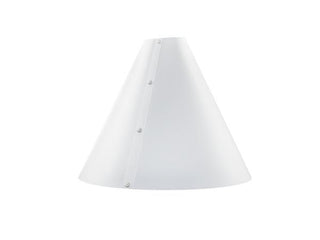
Diffusion spreads light across a larger visible surface. V-Flat World's Light Cone surrounds a small subject with polypropylene diffusion material. Light it from outside, then adjust the light's position and the camera angle. This can replace distracting room reflections with smoother highlights.
The cone is a light modifier and needs an external light source. Your light position, the object's shape and the camera view still determine the result. Keep enough tonal variation to describe the product's edges and shape.
Choose the model around your camera and subject
| Model | Height | Base diameter | Top opening |
|---|---|---|---|
| Phone | 12 inches | 14 inches | 1.5 inches; designed for a smartphone camera |
| Medium | 12 inches | 13 inches | 5 inches |
| Large | 18 inches | 20 inches | 5 inches |
Check your lens or phone camera against the opening and leave working room around the subject. A base diameter does not specify the largest product you can photograph: the camera angle, object height and framing also matter. The Medium & Large Kit contains those two sizes; the Phone model is sold separately.
Build a repeatable setup
- Place the subject on a stable surface and frame the camera.
- Position the cone around the subject and put the external light outside it.
- Move the light to shape a highlight, then adjust the product or camera angle.
- Check detail, edge separation and focus before photographing a full batch.
- Record the positions so you can repeat the setup for related products.
For background styling, see how to choose a food and product photography backdrop. For larger lighting control around a set, see our V-Flat lighting guide.